Data Exchange
The EPCIS Query Interface defined by GS1 in the EPCSI 2.0 follows REST interface principles and is defined concretely with an Open API definition. Those following the GTFBL framework are expected to…

The EPCIS Query Interface defined by GS1 in the EPCSI 2.0 follows REST interface principles and is defined concretely with an Open API definition. Those following the GTFBL framework are expected to implement the EPCIS Query Interface as a REST interface as defined by the EPCIS 2.0 standard.
Required REST API Methods
The following REST API methods SHALL be implemented.
GET /events
This endpoint is used to request all the events in the repository or a set of events matching the criteria included as query parameters in the requesting URL.
Required Query Parameters
The EPCIS Query Interface must also support the following query parameters in a named query or as parameters in the requesting URL.
Query Parameter Key | Value Format | Description |
LT_recordTime | ISO DateTime Stamp | This is a date time in the UTC format, following the xsd:dateTimeStamp data type. This will return all events where the recordTime is less than the provided value. |
GE_recordTime | ISO DateTime Stamp | This is a date time in the UTC format, following the xsd:dateTimeStamp data type. This will return all events where the recordTime is either greater than or equal to the provided value. |
LT_eventTime | ISO DateTime Stamp | This is a date time in the UTC format, following the xsd:dateTimeStamp data type. This will return all events where the eventTime is less than the provided value. |
GE_eventTime | ISO DateTime Stamp | This is a date time in the UTC format, following the xsd:dateTimeStamp data type. This will return all events where the eventTime is either greater than or equal to the provided value. |
MATCH_anyEPC | List of URIs | If this parameter is specified, the result will only include events (i.e. ObjectEvent, AggregationEvent, TransactionEvent, TransformationEvent, AssociationEvent or extension event types that extend one of those event types) that (a) have an epcList field, a childEPCs field, a parentID field, an inputEPCList field, or an outputEPCList field; and where (b) the parentID field or one of the EPCs listed in the epcList, childEPCs, inputEPCList, or outputEPCList field (depending on event type) matches one of URIs specified in this parameter. The meaning of “matches” is as specified in section 8.2.7.1.1 of the EPCIS 2.0 standard. |
MATCH_anyEPCClass | List of URIs | If this parameter is specified, the result will only include events (that is, ObjectEvent, AggregationEvent, TransactionEvent, TransformationEvent, AssociationEvent or extension event types that extend one of those event types) that (a) have a quantityList, childQuantityList, inputQuantityList, or outputQuantityList; and where (b) one of the EPC classes listed in any of those fields matches one of the EPC patterns or URIs specified in this parameter. The meaning of “matches” is as specified in section 8.2.7.1.1 of the EPCIS 2.0 standard. |
EQ_bizStep | List of URIs | If specified, the result will only include events that (a) have a non-null bizStep field; and where (b) the value of the bizStep field matches one of the specified values. If this parameter is omitted, events are returned regardless of the value of the bizStep field or whether the bizStep field exists at all. NOTE: It is always possible to return a “Query Too Complex” (413) if the filters provided are too broad or will return too many results. For example, if only the eventTypes filter parameter is provided, this may be deemed too broad to execute. |
EQ_transformationID | List of URIs | If specified, the result will include only events that (a) have a non-null transformationID and where (b) the value of the transformationID matches one of the specified values. If this parameter is omitted, events are returned regardless of the value of the transformationID filled or whether the field exists at all. This filter requirement was introduced to improve tracebacks on long running transformations. |
Required Search Parameter Patterns
The following search parameter patterns are required by the GFTBL
- MATCH_anyEPC + MATCH_anyEPCClass
- EQ_bizStep + GE_evenTime + LT_eventTime
- EQ_bizStep + GET_recordTime + LT_recordTime
Digital Link Requirements
The GTFBL requires the implementation of a GS1 Digital Link Resolver as defined in the GS1 Digital Link Standard.
Required Link Types
Link Type | Description |
gs1:epcis | This will return a link that points to the EPCIS Query Interface for the requested EPC. |
gs1:masterData | This will return a link that can resolve the GS1 Web Vocab JSON-LD for the requested GTIN/GLN/PGLN |
Required Application Identifiers
The following application identifiers for URL paths are required:
Application Identifier | Description |
01 | Product Definition Identifier |
414 | Location Identifier |
417 | Party Location Identifier |
21 | Serial Number |
10 | Lot Number |
Resolving Digital Link URI Identifiers
To resolve a Digital Link URI Identifier, replace the canonical base URL of the Digital Link URI Identifier with the base URL if the sender’s Digital Link Resolver.
Example Resolving a PGLN
Sender’s Digital Link Resolver Base URL | https://resolver.example.org/ |
Digital Link URI Identifier to Resolver (PGLN) | https://id.gs1.org/417/0860003130308 |
URL to Resolve Digital Link URI Identifier | https://resolver.example.org/417/0860003130308 |
GS1 Digital Link URL Structure
417 (PGLN)
Returns links about a specific Trading Party or Organization
This Application Identifier (PGLN) can be queried with either the gs1:masterData link type to get a link to the master data or with the gs1:epcis to get the default EPCIS Query Interface for the organization.
https://resolver.example.org/party/0860003130308
414 (GLN)
Returns links about a specific location.
This Application Identifier (GLN) can be queried with either the gs1:masterData link type to get a link to the master data or with the gs1:epcis to get the default EPCIS Query Interface for the organization.
https://resolver.example.org/gln/urn:gdst:example.org:location:loc:FARM1.0
01/<gtin>/10/<lot number>
Returns links about a specific batch/lot of a trade item. For the purposes of this standard, only the EPCIS Query Interface link is required to be returned for this endpoint.
This Application Identifier pair (GTIN/Lot) can be queried with the link type gs1:epcis.
https://resolver.example.org/gtin/00860003130308/lot/LOT07082021
01/<gtin>/21/<serial number>
Returns links about an individual instance of a trade item. For the purposes of this standard, only the EPCIS Query Interface link is required to be returned by this endpoint.
This Application Identifier pair (GTIN/Serial) can be queried with the link type gs1:epcis.
https://resolver.example.org/gtin/00860003130308/ser/ABCD-EFGH-1234-5678
Preparing for Data Exchange
Adding a Trading Party
Before companies start exchanging traceability data, they exchange company info to establish the other party in their respective systems. In addition to data about the company, the trading partners may exchange foundational info about the locations where exchanges of products will occur (e.g., processing plant, distribution center). This exchange can be accomplished simply by each company exchanging a Digital Link Resolver URI and optionally, an API Key. This enables companies to request the master data describing a party or location instead of for an object like demonstrated in the previous flows.
The GTFBL proposes that the following information is communicated to a trading party to grant them access to request data:
- GS1 Digital Link URI + Party GLN
- API Key
Example
https://resolver.trace-solution-example.com/417/0860003130308
81C6C194-B445-4FFB-907E-CDBC7FF7F36F
The example GS1 Digital Link URI shown above contains two parts: the Base URL, and the Party GLN highlighted in blue.
The Base URL is portion until the first application identifier is found. In the example, the first application identifier is ‘417’ for a Party Global Location Number. Then the value of ‘0860003130308` following the ‘417’ is the Party GLN of the Trading Partner.
It is possible to query the GS1 Digital Link Resolver URL + PGLN with the link type gs1:masterData to get information about the trading party. It is also possible to query the GS1 Digital Link Resolver URL + PGLN with the link type gs1:epcis to get the default EPCIS Query Interface URL of the Trading Party.
Authentication
The two parties exchanging data will need to exchange API Keys that can be used to access each other’s EPCIS Query Interface. Each request from the Receiver to the Sender will contain an HTTP Header X-API-Key that will contain the API Key.
X-API-Key 81C6C194-B445-4FFB-907E-CDBC7FF7F36F
https://resolve.example.org/party/0086003130308?linkType=gs1:masterData
Cases for not requiring Authentication can include but are not limited to:
A retailer or brand owner may wish to expose traceability data publicly about their products to consumers. They may choose to share the complete data or a redacted form of the data.
A brand owner may choose to expose their GS1Digital Link Resolver to share information about their trade items such as coupons, videos, additional information, or recipes
It is completely up to the Sender to manager, generate, and authenticate API Keys. This framework only specifies where to put and look for the API key if authentication is used.
Data Exchange Workflows
All requests between two parties exchanging traceability data will be done using HTTP request using the REST (REpresentational State Transfer) architecture. Responses must be returned in the EPCIS 2.0 JSON-LD format.
Business To Business Workflows
For the purpose of this workflow, we will designate the party requesting the traceability data as the Receiver and the party transferring the traceability data as the Sender. You can think of the Receiver as the party receiving goods from the Sender and the Sender as the party selling/transferring the goods to the Receiver. The Receiver will format one of the EPCs as a GS1 Digital Link URI to query the Sender’s GS1 Digital Link Resolver in order to discover the location of the EPCIS repository of the sender.
This first workflow illustrates how a Receiver obtains traceability data, a set of EPCIS events and master data, through a request and response exchange with an external system of the Sender. For the purpose of this workflow, we will assume that the Receiver (Buyer) has received a list of EPC(s) through a previous workflow and is now attempting to resolve traceability data and master data for these EPC(s).
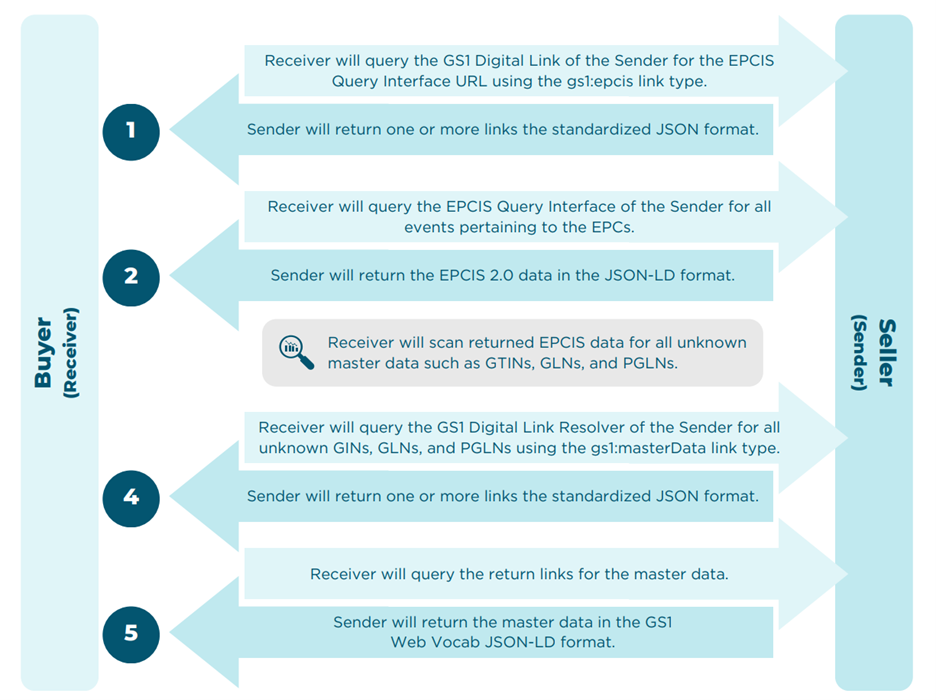
Figure 1 - Business to Business Workflow
Once the Receiver has a list of EPCs that they want to request traceability data for, the following workflow will take place:
Step 1
The Receiver will format one of the EPCs as a GS1 Digital Link URI andquery the Sender’s GS1 Digital Link Resolver in order to discover the location of the EPCIS repository of the sender. This request will return a link to an EPCIS repository associated with the sender and the EPC. The GS1 Digital Link URI shall be appended with the gs1:epcis link type in order to express to the Sender’s resolver that the Receiver wishes to locate an EPCIS repository.
They will use the link type gs1:epcis to signal they are looking for the EPCIS Query Interface that contains the event data for that EPC.
Alternatively, the Receiver may request the location of an EPCIS repository with a GS1 Digital Link URI with a PGLN identifying the Sender as an entity through use of the GS1 Application Identifier for a PGLN identifying a party, 417.
Step 2
The Receiver will query the EPCIS Query Interface for each EPC they wish to receive traceability data for. These queries will be returned from the Sender as one or more events formatted in an EPCIS 2.0 Query Document in the JSON-LD format.
Step 3
The Receiver will scan the received EPCIS event data for all distinct GTINs, GLNs, and PGLNs in the event data.
Step 4
The Receiver will then query the Sender’s GS1 Digital Link Resolver for each GTIN, GLN, and PGLN that is unknown to the Receiver. They can also choose to always query for the master data to ensure it is up to date.
The Receiver will use the link type gs1:masterData when querying the GS1 Digital Link Resolver to express to the Sender that only links or content are returned pertaining to master data.
Step 5
The Receiver will resolve each link and will expect the links to return the master data in the GS1 Web Vocab JSON-LD.
System to System Workflows
Individual organizations often need to transfer traceability data between two internal software systems. This may occur for several reasons, including:
- The organization is a large enterprise operating multiple software systems across different business units.
- The organization captures data through other operational systems—such as warehouse management, production floor, and/or enterprise resource planning (ERP) systems—and consolidates that data in a dedicated traceability solution.
- Data is recorded in a secondary traceability solution on behalf of the organization.
- The organization is transitioning from one traceability solution to another and must transfer historical data.
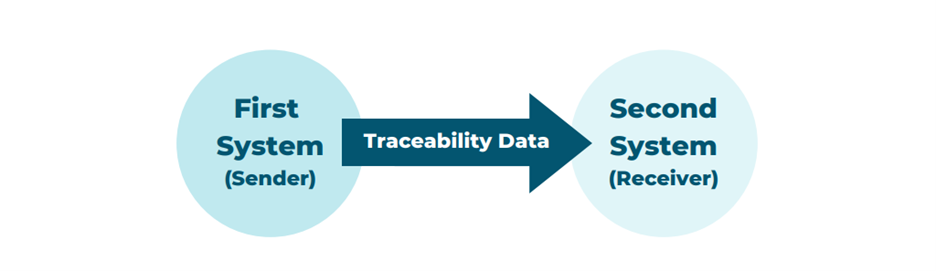
Figure 2 - System to System Workflow
In these situations, the data transfer process follows a similar but slightly different workflow than a typical business-to-business (B2B) exchange. In this workflow, the organization identifies the relevant time period for which traceability data needs to be migrated and synchronizes that data between systems. For the purpose of this workflow, the Sender refers to the originating system where the traceability data is stored and the Receiver refers to the destination system to which the data will be transferred.
Once the relevant period of time is defined, it will likely need to be broken into smaller portions of time (e.g. one day, one hour) to avoid a query that is too complex to execute.
Step 1
The Receiver will query the Digital Link URL with the link type gs1:epcis to obtain the EPCIS URL of the first system. This can be done by querying the base URL of the GS1 Digital Link with the following
Link Types
- {GS1_DIGITAL_LINK_BASE_URL}/417/{PGLN}?linkType=gs1:epcis
- https://www.example.org/417/urn:gdst:example.org:party:123.0/digital_link? linkType=gs1:epcis
Step 2
The Receiver will then query the EPCIS API method /queries/SimpleEventQuery for all events that were recorded between the start of the slice of time and the end of the slice of time.
Step 3
The Receiver will scan the received EPCIS event data for all identifiers (e.g. GTIN, GLN, GDST Identifiers, etc.) in the event data.
Step 4
The Receiver will then query the Sender’s GS1 Digital Link Resolver for each identifier (e.g. GTIN, GLN, GDST Identifiers) that is unknown to the Receiver.
The Receiver will use the link type gs1:masterData when querying the GS1 Digital Link Resolver to limit the links returned to those pertaining to master data.
Step 5
The Receiver will resolve each link and will expect the links to return the master data in the GS1 Web Vocab JSON-LD.
Master Data Resolution
When an EPCIS Query Document is returned from the EPCIS Query Interface, the following steps must be run in order to ensure master data has been resolved:
Step 1
Scan the EPCIS Query Document for all distinct master data identifiers (e.g. GTINs, GLNs, PGLNs or equivalent GDST Identifiers)
Step 2
The Receiver SHOULD filter the list of distinct identities down to only the master data identifiers which are unknown.
The Receiver can choose to always resolve master data identifiers whether they are known to them or not.
Step 3
Query the Digital Link resolver of the party you are requesting traceability information from for each unknown identifier.
Step 4
The party behind the Digital Link Resolver will return the master data associated with the identifiers in the GS1 Web Vocab JSON-LD format.
How did we do?
Framework Requirements Summary